What is PayPal and how does it work?

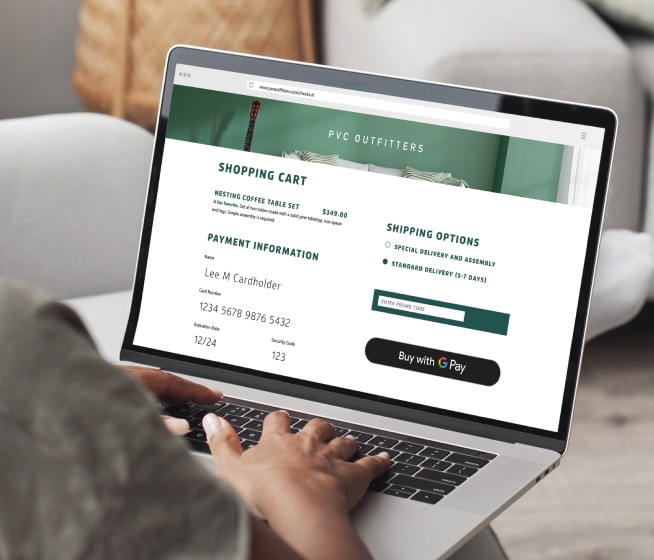
Put simply, PayPal® is a digital payment service that organizes your existing payment methods into one account so you can make transactions more easily. If you’ve ever bought anything online, you’ve probably seen the PayPal button as a payment option.
But if you’ve never used PayPal yourself, you may be wondering how it works. Read on to learn more.
What you’ll learn:
-
Digital wallets like PayPal allow you to pay for things without using physical cards or cash.
-
With PayPal, you can send and receive money for personal or business purposes.
-
Some PayPal services are free, but some may charge a transaction fee.

What is PayPal?
PayPal is one of the most popular digital wallets—used by millions of people all over the world. It’s mainly used as a digital payment method for sending and receiving money for personal or business reasons, as well as making purchases online and in stores.
How does PayPal work?
PayPal works by creating an account and then linking it to payment methods such as your bank account, credit card or debit card. Then you’ll be able to make payments using PayPal without having to share your financial details with merchants. When you receive money through peer-to-peer (P2P) payments, you’ll have the option to store your money as a PayPal account balance or transfer it to your bank account.
Is PayPal free?
Many PayPal services are free, including:
- Creating an account
- Making online purchases
- Sending and receiving money domestically from your PayPal balance or linked bank account
- Transferring your PayPal account balance to your bank account
But PayPal charges some fees for certain types of transactions, such as international payments and sending money using a credit or debit card.
How to set up a PayPal account
To create a PayPal account, go to the PayPal website or download the app on your smartphone and follow these steps:
-
Click the Sign Up button.
-
Select either a personal account or business account.
-
Follow any prompts for adding required information, verifying your identity and agreeing to the privacy policy.
What do you need to open a PayPal account?
To create a PayPal account, you’ll need an internet connection, a smartphone or computer to access the PayPal app or website, an email account, a cellphone number, and basic personal information such as your name and address.
How do you add a credit card, debit card or bank account to your PayPal account?
To add payment methods to your PayPal account via the PayPal app, tap Accounts and scroll down to Linked bank and cards. Tap Add new and follow the instructions on screen. To add payment methods to your PayPal account via the PayPal website, select Wallet at the top of the page. Then select Link a card or bank and follow the prompts.
If you’re a Capital One cardholder, you can also easily add a card from the Capital One Mobile app by going to the Digital Wallet Manager in your profile and following the instructions on screen.
Some cardholders may prefer to link their credit card to PayPal over their debit card. It may make it easier to dispute charges while also allowing you to redeem rewards. Consider what makes the most sense for you and how you like to shop.
How to use PayPal
Here are a few different ways you can use PayPal:
Sending money
To send money to someone you know, open PayPal and follow these steps:
- If the recipient has a PayPal QR code, click Scan/Pay. If they don’t, click Send and enter the person’s name, email address or phone number.
- Enter the amount of money you want to send.
- If you want, you can add a message or notation.
- Select Friends and Family. If you’re buying something at a store or paying someone for their services, you can select Goods and Services, which charges the recipient a fee.
You might want to be cautious if you’re sending money to someone for the first time. To make sure you have the right person, you could ask them to send you a request from their app. Or you could send a small test amount before sending the actual amount.
Receiving money
If someone wants to send you money, there are two ways to start the process:
- They could initiate the payment by scanning your QR code or clicking Send and entering your email address or cellphone number.
- You could initiate the payment by clicking the Request button. You can then choose from options such as searching for the person paying you by entering their email address or cellphone number, creating a PayPal.Me link to share, splitting a bill or creating an invoice.
Either way, when the money is deposited, you’ll receive a notification—either by email or through the PayPal app. Then you can decide whether to leave it there for future use or transfer it to your bank account.
For a business account, PayPal offers several ways for you to get paid. You could:
- Create, print and display a QR code
- Get a personal payment link to text or post on social media
- Create an invoice on the app to text or email
Transferring your PayPal balance into your bank account
To transfer your PayPal balance to your bank account after you’ve linked them, sign in to your PayPal account and select the option Transfer Money, and then Transfer to Your Bank. Select your preferred account under either the instant or standard section, and follow the prompts.
An instant transfer can cost extra, but it typically takes just a few minutes to process. A standard transfer is free and can take one to three business days.
Using some of PayPal’s other functions
Once you’ve become comfortable using PayPal, consider exploring its other services. You could:
- Withdraw cash from ATMs in the MoneyPass® network.
- Get your paycheck directly deposited two days earlier.
- Deposit a check through the Cash a Check feature.
- Earn interest on savings through its partnership with Synchrony Bank.
- Buy, sell and transfer cryptocurrencies, including bitcoin, bitcoin cash, ethereum and litecoin.
- Set up automatic bill pay.
What are the pros and cons of PayPal?
PayPal offers a range of benefits, such as quick access to funds and built-in protections, but it also has some drawbacks—like potential fees, transfer delays and certain limitations compared to traditional banking services. Here are some pros and cons to consider.
Pros
PayPal has several benefits:
-
Speed: PayPal instant transfers are typically completed within minutes, so you don’t have to wait long for your money to become available.
-
Added security: PayPal uses tokenization, so your actual card number isn’t shared with merchants—unlike when you hand your credit card to a retail store clerk or type a card number online. PayPal also offers purchase protection in the form of fraud prevention, 24/7 transaction monitoring, dispute resolution and refunds.
-
Convenience: You typically don’t need to have your credit card handy or manually type in your credit card number, expiration date and three-digit security code. It’s all stored.
-
Charity: If you donate money to a qualifying charity through PayPal, the company waives the transaction fee.
Cons
Some potential disadvantages of PayPal include:
-
Fraud and scams: Despite PayPal’s security measures, using any online payment platform can still come with risks. PayPal can be a target for fraud or scams, especially if your account information is compromised. For example, someone could access your PayPal account if your smartphone is lost or stolen.
-
Difficulty reversing payments: Since PayPal typically deducts a payment from your balance immediately, it could be difficult to undo the transaction if you make a mistake or change your mind.
-
Slow standard transfer times: Transferring funds to your bank account can take one to three days for a standard transfer—even if the payment shows up in your PayPal account instantly.
-
Limited services: Unlike a traditional bank, PayPal doesn’t offer full financial services—such as investment accounts, car loans or home mortgages.
Can I use credit card rewards with PayPal?
Yes, you can pay using your credit card rewards with PayPal at millions of online retailers, depending on your card issuer. For example, Capital One cardholders may be able to redeem rewards when checking out with PayPal. Just follow a few steps:
-
Shop online at any participating retailer’s website.
-
When you’re done shopping, choose PayPal Checkout and select your Capital One rewards card as your payment method.
-
Choose Use Capital One Rewards.
You’ll be able to use available rewards toward your purchase. If you can’t pay fully with your rewards, you can use your Capital One credit card for the rest and earn rewards to use on your next transaction.
PayPal FAQ
Here are answers to a few commonly asked questions about PayPal.
Why can’t I use PayPal as a payment method?
You may not be able to use PayPal if your payment is declined by your bank or card issuer, your card details are outdated, or your account has limitations or requires verification. Payments can also fail if there are insufficient funds or if PayPal flags the transaction for security reasons. In some cases, the issue may be temporary, and updating your payment information could resolve it.
What’s the difference between paying with PayPal and a bank transfer?
PayPal processes payments through your PayPal account, while a bank transfer sends money directly between bank accounts. PayPal offers protections like encryption and buyer protection for eligible transactions, which can help safeguard online purchases. Bank transfers can also be secure, but authorized transfers are typically harder to reverse once sent and generally don’t offer the same purchase protections as PayPal.
What’s the difference between paying with PayPal and a debit card?
PayPal acts as an intermediary between your debit card and the merchant, while paying directly with a debit card draws funds from your linked bank account. PayPal generally doesn’t share your full financial information directly with merchants, and eligible transactions may include purchase protection. Debit cards may also include fraud and dispute protections provided by your bank or card issuer.
Key takeaways: How PayPal works
With a digital wallet like PayPal, some financial transactions can be done in a breeze. And PayPal offers many services beyond just making purchases and money transfers.
Ready to use your Capital One card with PayPal? Learn more about adding your Capital One card to your PayPal wallet.