What are virtual credit card numbers and how do they work?
Virtual card numbers are unique numbers from your credit card issuer that are linked to your credit card account. They allow you to shop online without giving stores your actual card number, adding an extra layer of security to your purchases to help protect your credit card from potential fraud.
Thanks to virtual card numbers, you can shop online faster and without needing your physical card. Learn more about how virtual card numbers work and how they can help keep your account information more secure.
What you’ll learn:
-
Virtual credit card numbers can be used in place of your physical card’s number when you’re shopping online to help keep your credit account more secure.
-
In addition to general virtual cards that can be used anywhere online, there are store-specific virtual card numbers that are only valid with one particular merchant.
-
Capital One cardholders can access virtual cards from the Capital One Mobile app and with autofill on Chrome or in Android apps.
-
Digital wallets and virtual cards both enable you to make purchases without using physical cards or exposing your actual card number, but virtual cards are primarily for online shopping.
How do virtual cards work?
You can think of a virtual card number as a substitute for your actual credit card number to use when you’re shopping online. That way, the numbers on your physical credit card aren’t shared with the websites you’re shopping on—adding an extra layer of security and protecting you from potential fraud.
You can use a virtual card just like you use your physical credit card—just shop online, start the checkout process and use a virtual card number to complete your purchase. Charges will show up in your monthly account statements just like they usually do for purchases made using your physical card.

Source: Based on e-commerce transactions from June 2024 to June 2025
Types of virtual cards
There are two different types of virtual cards:
-
Virtual card numbers for use anywhere online: You can get a virtual credit card number that can be used with most merchants online. This type of virtual card number is the same for every transaction.
-
Store-specific virtual card numbers: If eligible, you can also create virtual credit card numbers good for use at one store only. You can have multiple store-specific virtual cards at the same time. Store-specific virtual cards provide added peace of mind because if the store’s payment data gets compromised, your unique virtual card number can’t be used anywhere else.
How can I get a virtual credit card number from Capital One?
There are several ways to get a virtual credit card number with Capital One. But generally, if your account is eligible for a virtual card, you can get one by signing in to your account online or on the Capital One Mobile app.
Here’s a closer look at how to get virtual card numbers using various methods.
How to get a general-use virtual credit card number
Get your general-use virtual card number by following these steps:
-
Sign in to your Capital One account.
-
Tap the Get your virtual card button that appears beneath your credit card balance.
-
Following the security check prompts, you’ll be able to view your virtual credit card number.

How to get a store-specific virtual credit card number with the Capital One Mobile app
You can create virtual cards for specific stores by following these steps:
-
Sign in to your account on the app.
-
On your eligible card’s tile, tap Get your virtual card.
-
Locate the section Add to a store and select Create for a specific store.

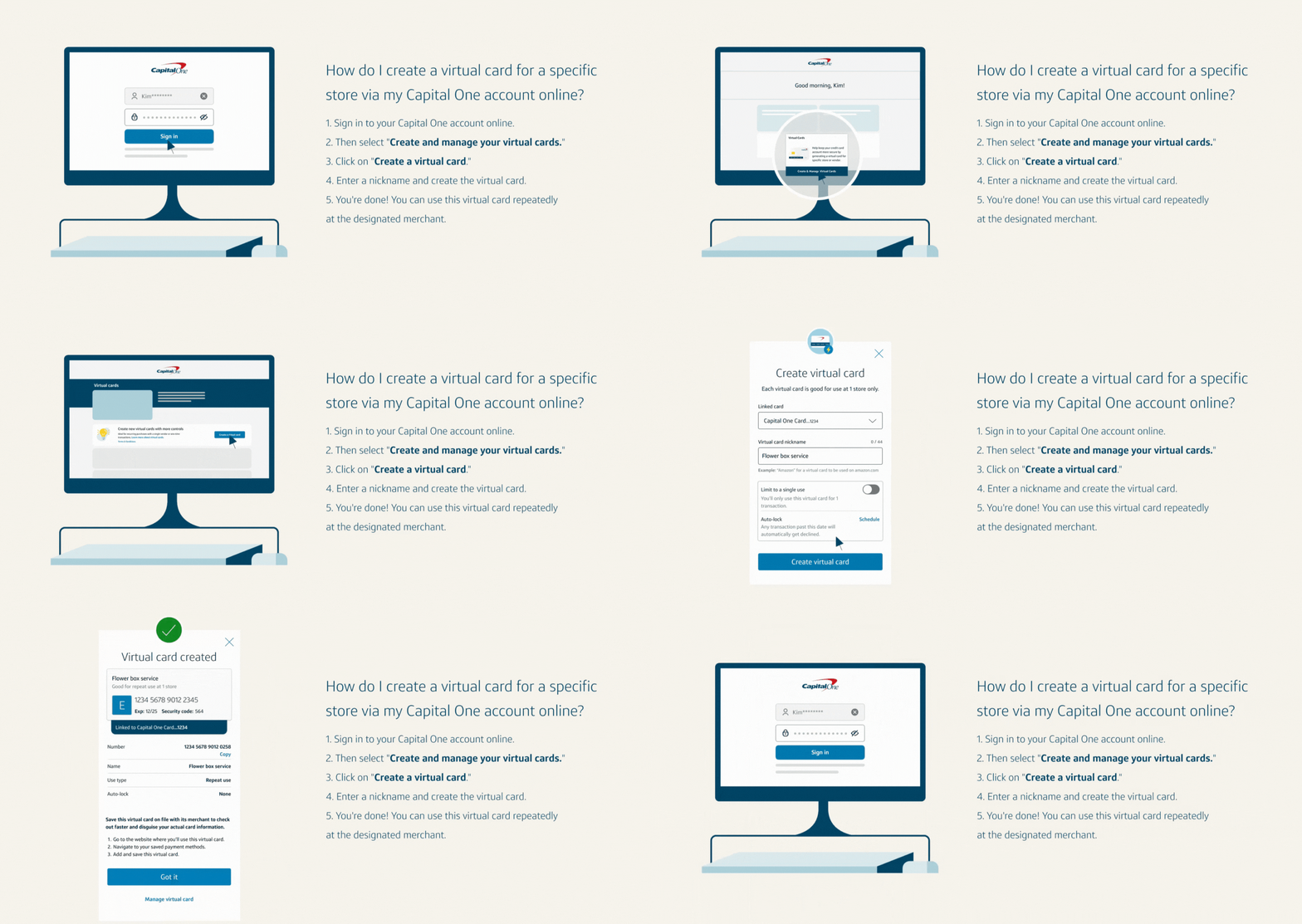
How to get a store-specific virtual credit card number with your Capital One account online
You can create store-specific virtual card numbers through your online account. Follow these steps:
-
Find the tile for your eligible card and tap Get your virtual card.
-
Tap the Create a virtual card button.
-
Manage your virtual cards by selecting the Virtual card manager tab at the top.
How to get a virtual credit card number with Google Pay™
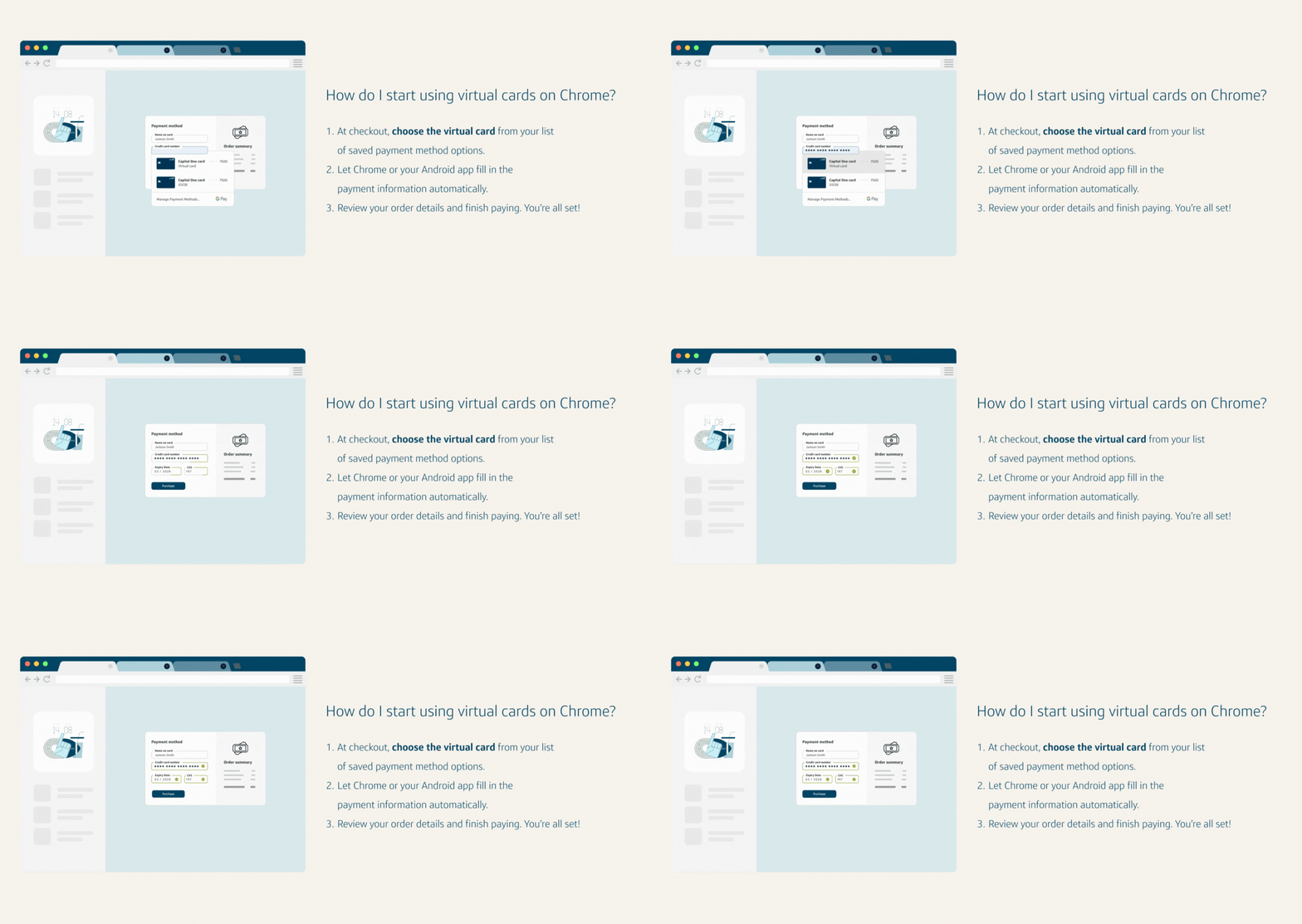
Another option is to create a virtual card with Google Pay by shopping online using Google Chrome or in Android apps. Select the virtual card you want to use from your saved payment options within the autofill drop-down menu during checkout. Chrome will automatically fill in the virtual card number so you can review your purchase details and complete your payment.
What are the benefits of using virtual card numbers?
Simply put, virtual cards can make online shopping easier and more secure as well as provide more control over your shopping experience.
Here are some of the benefits of using virtual cards:
-
Virtual cards are easy to create and manage online and on the Capital One Mobile app.
-
You can use a virtual card to make online purchases without revealing your physical card number to merchants, which can help safeguard your personal information from potential fraud.
-
Virtual cards enable you to shop online without needing your physical card.
-
Virtual cards may be available for new credit card customers as soon as they’re approved, before their physical card arrives in the mail.
-
If you need to replace your physical card and your actual card number changes, your virtual card numbers connected to your account will continue to work.
-
Virtual card numbers can be automatically filled in when checking out online if they’re generated using Google Pay on Chrome.
-
You can lock or unlock a virtual card anytime without affecting your actual card number.
What’s the difference between virtual cards and digital wallets?
Virtual cards help protect your actual card information when you’re shopping online. Some digital wallets can do more, including storing different kinds of cards and other documents and making in-person purchases in stores using your mobile device.
Digital wallets are exactly what they sound like—digital versions of physical wallets. They can store things like credit cards, loyalty cards, boarding passes and tickets. Some states even allow people to store a virtual copy of their driver’s license. You can access your digital wallet from devices including smartphones, smartwatches, computers and tablets.
Key takeaways: Virtual card numbers
Virtual credit cards are tied to your credit card account but have their own unique card numbers— enabling you to shop online without sharing your actual credit card number. There are general virtual card numbers that work on any site, as well as store-specific virtual card numbers that only work with one particular merchant.
If you’re a Capital One cardholder, it’s easy to set up and manage virtual card numbers using your account online or on the mobile app. Download the Capital One Mobile app today to get started.


